7 HTML Guidelines For Website Usability & SEO



7 HTML Guidelines For Website Usability & SEO


HTML Guidelines Usability SEO

It can be safely stated that everyone who owns a website wants their site to attract more traffic as this presents it with better growth opportunities. This is where many would state that Search Engine Optimization (SEO) comes to play. But in the bid to win the love, admiration and favor of search engines, people tend to forget the importance of website usability as a force that also drives quality traffic. 

As search engines become smarter and more human-like in the way they rank their resuclts, website optimization becomes more refined and gives more opportunity to tweak to improve your website for both usability and SEO. A number of articles in this blog have been written to explain how you can do this. I would advise looking at articles such as:
  • Content Density – Importance for Usability and SEO
  • 10 Guidelines for Writing Usable and SEO Friendly Content
  • 12 Effective Guidelines For Breadcrumb Usability and SEO
  • 15 Title Tag Optimization Guidelines For Usability and SEO
In this article I will be using this reasoning to provide you with a set of guidelines on how to make use of HTML tags to improve your website’s usability and SEO. Before I begin, one small word of caution – search engine ranking is not affected by the quality of your code. Similarly, since usability is mainly about the user interface aspect of your website, users will see the result of the web browser’s interpretation of that code and not the code itself. Therefore, it is important to note that this article will not discuss HTML coding or HTML code optimization but rather how the content of HTML code will bring benefits for your website’s usability and SEO.

1. <head>

HTML Guidelines Usability SEO - Head Tag

SEO: This is the most important section of the entire HTML structure of your website from SEO perspective. Here you are going to insert the title tags, the meta description and even the search engine analytics code is most likely to get its place here. Moreover, the head tag houses some other crucial tags like the meta tags, and of course the all-important rel=”canonical” tags. All of these will be discussed individually in the points below. However, due to its overall importance, I felt that the head tag should itself have a point of its own.

Usability: From a usability point of view, the head tag may not seem important, since this section is not going to affect the look and feel of the website (save for the title tag). However, since much of the content of the head tag will be reflected in the Search Engine Results Page (SERP), if this content is perceived as deceitful or unprofessional, it will keep users from clicking to access your site. Google and other search engines will be using the content of the meta tags in the head tag in order to decide the snippet of your website. Thus, you need to make it as clean and usable as possible.

2. <title>
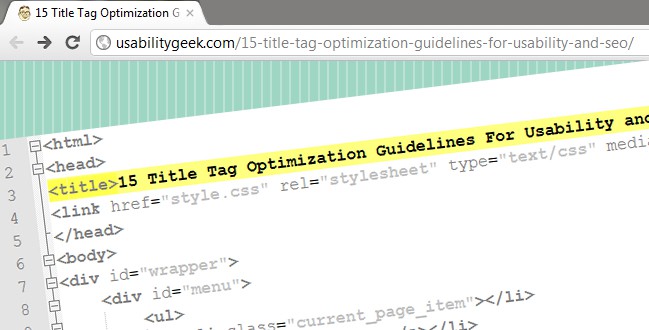
HTML Guidelines Usability SEO - Title Tag
SEO: The good old days where stuffing your title tag with random keywords in order to attract search engine traffic have long gone. Search engines will display the content of your title tag as the clickable headline for listings on SERPs. They also use it to determine the topic of the web page. This is because search engine spiders or crawlers analyze the content of the page title and then translate the page topic.

The content of your title tag must reflect the content of your web page. By keeping this simple rule in mind whilst introducing your keywords ideally at the beginning of your title tag will give you an SEO-friendly title tag. 

Usability: Users identify the web sites that are likely to contain the information they are searching for within the list of web sites on a SERP. Because web browsers use the title tags to label their tabs, users ultimately read the content of title tags to locate the tab in their web browser which contains the site they want to view.

By default, web browsers assign the content of the title tags to bookmarked sites. Thus users will also reference the content of title tags to locate web sites that they have bookmarked in their browser. Social bookmarking sites such as Facebook automatically retrieve the content of title tags when users attach a link for sharing. Thus, users will ultimately reference the content of title tags to determine whether a web site that others have bookmarked in a social bookmarking web site is worth checking out.

3. <meta name="description" …

HTML Guidelines Usability SEO - Meta Tag


SEO: Search engines retrieve the content placed in the meta description tag to display it as the website description in their SERP. Since the length of meta description content that is displayed in the SERP varies with different search engines, it is recommended not to exceed 160 characters. Although Google does not use the content of meta tags for their web ranking, the presence of keywords in the meta description can still attract search traffic since it will gain the attention of users.

Usability: From a usability point of view, descriptive, honest and different meta descriptions for each page on your site is a must. As stated above, users will see the content of the meta description in their SERP. If they see several listings from the same site with the same meta description then they will have a problem in identifying which link to click. Additionally if they access a site via the SERP because the content of the description is appealing but what they find is different from what they perceive, then this too will have a negative effect on the user experience.

4. rel=”canonical”

HTML Guidelines Usability SEO - Rel Canonical Tag


SEO : A canonical page is the preferred version of a set of pages with highly similar content. If you have pages with similar content save for some minor, slight variations, setting a particular URL as canonical will overcome the problem of duplicate content in your site. Duplicate content is indeed heavily penalized by search engines.

Usability: Having pages with identical or very similar content is a factor that confuses users. If such duplicate content is present in links or navigation, then users will be at a loss as on which links to click on. Conversely, if the same content is accessed via differently named links, then this too will confuse users as they will try to see if the content is different.

5. <a href=”..

HTML Guidelines Usability SEO - A Link Tag


SEO: Needless to say, links are essential for SEO. Together with XML sitemaps, they represent the only way in which search engine crawlers locate and index web pages. Google makes use of link juice in order to determine the value of links for its web ranking. For links to be search engine friendly they need to be descriptive (including in the title attribute) and must contain the keywords
.
Usability: Having usable links effectively means that users are more likely to achieve the objective of why they are in your web site (be it for information searching purposes or purchasing of products or services). This goal achievement will positively affect their experience, thus increasing the likelihood that they will re-visit your site and/or recommend it to their peers.

6. <link rel="stylesheet"…

HTML Guidelines Usability SEO - CSS


SEO: When JavaScript (JS) and Cascading Style Sheets (CSS) code is embedded in HTML files, it makes those files larger in size, thus making them slower to load. Search engines penalize slow-loading websites and Google have even introduced site speed in web search ranking. The best solution is to externalize the JS and CSS files, and fetch the code whenever required. Better still, these external CSS and JS files should be compressed as this will make them smaller in size and hence fetched faster. Minimizing the number of server calls to fetch these files by achieving a balance between the number of files and their sizes can also be beneficial in improving the site speed.

Usability: Users typically spend between 10 and 20 seconds on a web page unless the content grabs their attention. Now imagine how quickly users will leave a web page if that content takes very long to load! Studies conducted by Google confirmed that “faster sites create happy users” and “when a site responds slowly, visitors spend less time there”.

7. Microdata

HTML Guidelines Usability SEO - Microdata


SEO : Microdata is one of three code languages designed to provide search-engine spider programs with information about website content. Better still, the accepted format for microdata, Schema.org has been endorsed by Google, Bing and Yahoo! As explained by AJ Kumar of Entrepreneur.com, microdata provides search engine spider programs with more context for the type of information on a website and the way the site should be indexed and ranked. Additionally, it also creates “rich snippets,” which display more information on the SERPs than traditional listings. 

Usability: Since search engines are able to learn more about the sites they are indexing, then they can present users with better results and more information via their SERPs. Implementing microdata is thus beneficial in the commencement of a positive user experience even before accessing the site itself.

SEO Factors To Consider When Choosing A Domain Name


The old saying “a stitch in time saves nine” couldn’t be more applicable than when it comes to launching a new website. It pays to take the time “make your list and check it twice.” Making the right choices before you launch a website can save a lot of time later.

Obviously, one of the most important decisions you’ll need to make when launching a new site is your domain. Since about ⅔ of consumers use search engines to help make buying decisions, search engine traffic is critical to the success or failure of most websites. This results in SEO being a common decision-making factor for choosing a domain.

How will my domain name impact SEO?

There are two primary ways your domain will impact your future SEO efforts and search rankings:
              ·         Keywords
              ·         Branding


Let’s examine each of these in more detail.


Historically, m any SEOs chose domain names that included their target keyword phrases. For example, if you wanted to rank for the keyword green widgets, you might use a domain such as greenwidgets.net (exact match domain or EMD) or greenwidgetsshop.com (phrase match domain or PMD). The presence of the keyword phrase in the domain made it easier to gain a high ranking for that keyword phrase.

With the introduction of recent algorithms such as the Penguin update and the Exact Match Domain (EMD) update, Google has changed how they view domains that include keywords. Is it still worthwhile to choose a domain that includes your target keyword phrase? Let’s look at the data.

Should you choose a domain name with your keywords in it?

Our recent Google’s EMD Update study found that after the Google EMD Update:
          ·         Average EMD site ranking decreased from #13.4 to #26.6
          ·         Average PMD site ranking decreased from #39.7 to #47.7


From this data, we can draw the conclusion that EMDs (and PMDs) no longer provide the same ranking boost that they used to. However, EMDs can, and in many cases do, still rank well. Our advice regarding keywords in your domain is:

          ·         If you already own an EMD or PMD, you don’t necessarily need to get rid of it
          ·         If you’re buying a new domain, an EMD or PMD isn’t necessarily bad, but branding factors are more           important
         ·         If you can buy a domain that includes one or more of your keywords without sacrificing any branding considerations, that may be a good choice

It may interact with SEO in a less obvious way, but branding is actually the most important SEO consideration for purchasing a new domain. Your online brand (how people perceive and remember you) will directly impact your SEO efforts and results. Why? It’s simple:

         ·         “Brands are the solution, not the problem. Brands are how you sort out the cesspool.” ~Google CEO  Eric Schmidt
        ·         Google likes brands, because users like brands. Which site would you rather read, link to, or share with your friends – NYtimes.com or your-ny-news-stuff.com ?

See The Rise of Brands in Google’s Relevancy Algorithms.

A strong online brand means users are more likely to click on, read, share, and link to a website…all of which will help the site gain higher Google rankings.

Choosing a domain as the foundation of your online brand

The first step in building a strong online brand is choosing a good domain. Choose a domain that is:
·         Memorable. You have no hope of building a brand if users can’t remember your name.
             ·         Unique. A generic sounding name, such as musicsite.com won’t have the same impact as a unique domain name.
          ·      Relevant. Some domains are industry-neutral, whereas others are clearly relevant to a specific industry (example: WebMD).
             ·      Not error-prone. For instance, a domain such as example.ws is a branding nightmare, because users will tend to type example.com instead. Delicious changed its domain name because so many users got confused by their non-standard domain.
            ·       Short. Most well-known online brands are 1-2 words or less. SEOmoz suggests sticking to a domain of 15 characters or less.

Remember that your domain is just the start of building a brand – an essential step, but only the first step.

Bonus Tip: Avoid Hyphens

If mysite.com is taken, should you buy my-site.com? No. Here are 3 reasons to avoid hyphenated domains.
           
           ·         Domains that include hyphens may be a negative SEO ranking factor.
           ·         Many users will type the domain without the hyphens and end up on a different site.
           ·         Hyphenated domains are often perceived as lower quality.

Pay per click


Pay-per-click (PPC) (also called cost per click) is an internet advertising model used to direct traffic to websites, in which advertisers pay the publisher (typically a website owner) when the ad is clicked. It is defined simply as “the amount spent to get an advertisement clicked. 

With search engines, advertisers typically bid on keyword phrases relevant to their target market. Content sites commonly charge a fixed price per click rather than use a bidding system. PPC "display" advertisements, also known as "banner" ads, are shown on web sites or search engine results with related content that have agreed to show ads.

In contrast to the generalized portal, which seeks to drive a high volume of traffic to one site, PPC implements the so-called affiliate model, which provides purchase opportunities wherever people may be surfing. It does this by offering financial incentives (in the form of a percentage of revenue) to affiliated partner sites. The affiliates provide purchase-point click-through to the merchant. It is a pay-for-performance model: If an affiliate does not generate sales, it represents no cost to the merchant. Variations include banner exchange, pay-per-click, and revenue sharing programs.

Websites that utilize PPC ads will display an advertisement when a keyword query matches an advertiser's keyword list, or when a content site displays relevant content. Such advertisements are called sponsored links or sponsored ads, and appear adjacent to, above, or beneath organic results on search engine results pages, or anywhere a web developer chooses on a content site.

The PPC advertising model is open to abuse through click fraud, although Google and others have implemented automated systems to guard against abusive clicks by competitors or corrupt web developers. 

Purpose
Cost per click, along with cost per impression and cost per order, are used to assess the cost effectiveness and profitability of internet marketing. Cost per click has an advantage over cost per impression in that it tells us something about how effective the advertising was. Clicks are a way to measure attention and interest. Inexpensive ads that few people click on will have a low cost per impression and a high cost per click. If the main purpose of an ad is to generate a click, then cost per click is the preferred metric. Once a certain number of web impressions are achieved, the quality and placement of the advertisement will affect click through rates and the resulting cost per click.

Construction
Cost per click is calculated by dividing the advertising cost by the number of clicks generated by an advertisement. The basic formula is:

Cost per click ($) = Advertising cost ($) ÷ Ads clicked (#)

There are two primary models for determining cost per click: flat-rate and bid-based. In both cases the advertiser must consider the potential value of a click from a given source. This value is based on the type of individual the advertiser is expecting to receive as a visitor to his or her website, and what the advertiser can gain from that visit, usually revenue, both in the short term as well as in the long term. As with other forms of advertising targeting is key, and factors that often play into PPC campaigns include the target's interest (often defined by a search term they have entered into a search engine, or the content of a page that they are browsing), intent (e.g., to purchase or not), location (for geo targeting), and the day and time that they are browsing.

Flat-rate PPC
In the flat-rate model, the advertiser and publisher agree upon a fixed amount that will be paid for each click. In many cases the publisher has a rate card that lists the cost per click (CPC) within different areas of their website or network. These various amounts are often related to the content on pages, with content that generally attracts more valuable visitors having a higher CPC than content that attracts less valuable visitors. However, in many cases advertisers can negotiate lower rates, especially when committing to a long-term or high-value contract.

The flat-rate model is particularly common to comparison shopping engines, which typically publish rate cards. However, these rates are sometimes minimal, and advertisers can pay more for greater visibility. These sites are usually neatly compartmentalized into product or service categories, allowing a high degree of targeting by advertisers. In many cases, the entire core content of these sites is paid ads.

Bid-based PPC
The advertiser signs a contract that allows them to compete against other advertisers in a private auction hosted by a publisher or, more commonly, an advertising network. Each advertiser informs the host of the maximum amount that he or she is willing to pay for a given ad spot (often based on a keyword), usually using online tools to do so. The auction plays out in an automated fashion every time a visitor triggers the ad spot.

When the ad spot is part of a search engine results page (SERP), the automated auction takes place whenever a search for the keyword that is being bid upon occurs. All bids for the keyword that target the searcher's geo-location, the day and time of the search, etc. are then compared and the winner determined. In situations where there are multiple ad spots, a common occurrence on SERPs, there can be multiple winners whose positions on the page are influenced by the amount each has bid. The ad with the highest bid generally shows up first, though additional factors such as ad quality and relevance can sometimes come into play (see Quality Score).The predominant three match types for both Google and Bing are broad, exact and phrase. Google also offers the broad modifier match type.

In addition to ad spots on SERPs, the major advertising networks allow for contextual ads to be placed on the properties of 3rd-parties with whom they have partnered. These publishers sign up to host ads on behalf of the network. In return, they receive a portion of the ad revenue that the network generates, which can be anywhere from 50% to over 80% of the gross revenue paid by advertisers. These properties are often referred to as a content network and the ads on them as contextual ads because the ad spots are associated with keywords based on the context of the page on which they are found. In general, ads on content networks have a much lower click-through rate (CTR) and conversion rate (CR) than ads found on SERPs and consequently are less highly valued. Content network properties can include websites, newsletters, and e-mails.

Advertisers pay for each click they receive, with the actual amount paid based on the amount bid. It is common practice amongst auction hosts to charge a winning bidder just slightly more (e.g. one penny) than the next highest bidder or the actual amount bid, whichever is lower. This avoids situations where bidders are constantly adjusting their bids by very small amounts to see if they can still win the auction while paying just a little bit less per click.

To maximize success and achieve scale, automated bid management systems can be deployed. These systems can be used directly by the advertiser, though they are more commonly used by advertising agencies that offer PPC bid management as a service. These tools generally allow for bid management at scale, with thousands or even millions of PPC bids controlled by a highly automated system. The system generally sets each bid based on the goal that has been set for it, such as maximize profit, maximize traffic at breakeven, and so forth. The system is usually tied into the advertiser's website and fed the results of each click, which then allows it to set bids. The effectiveness of these systems is directly related to the quality and quantity of the performance data that they have to work with — low-traffic ads can lead to a scarcity of data problem that renders many bid management tools useless at worst, or inefficient at best.

Types of email marketing


Email marketing is directly marketing a commercial message to a group of people using email. In its broadest sense, every email sent to a potential or current customer could be considered email marketing. It usually involves using email to send ads, request business, or solicit sales or donations, and is meant to build loyalty, trust, or brand awareness. Email marketing can be done to either cold lists or current customer database. Broadly, the term is usually used to refer to:
  • Sending email messages with the purpose of enhancing the relationship of a merchant with its current or previous customers, to encourage customer loyalty and repeat business.
  • Sending email messages with the purpose of acquiring new customers or convincing current customers to purchase something immediately.
  • Adding advertisements to email messages sent by other companies to their customers.
Researchers estimate that United States firms alone spent US $1.51 billion on email marketing in 2011 and will grow to $2.468 billion by 2016.

Types of email marketing

Email marketing can be carried out through different types of emails:

Transactional emails

Transactional emails are usually triggered based on a customer’s action with a company. Triggered transactional messages include dropped basket messages, purchase or order confirmation emails and email receipts.
The primary purpose of a transactional email is to convey information regarding the action that triggered it. But, due to its high open rates (51.3% compared to 36.6% for email newsletters) transactional emails are a golden opportunity to engage customers; to introduce or extend the email relationship with customers or subscribers, to anticipate and answer questions or to cross-sell or up-sell products or services.
Many email newsletter software vendors offer transactional email support, which gives companies the ability to include promotional messages within the body of transactional emails. There are also software vendors that offer specialized transactional email marketing services, which include providing targeted and personalized transactional email messages and running specific marketing campaigns (such as customer referral programs).

Direct emails

Direct email involves sending an email solely to communicate a promotional message (for example, an announcement of a special offer or a catalog of products). Companies usually collect a list of customer or prospect email addresses to send direct promotional messages to, or they can also rent a list of email addresses from service companies.

Comparison to traditional mail

There are both advantages and disadvantages to using email marketing in comparison to traditional advertising mail.

Advantages

Email marketing (on the Internet) is popular with companies for several reasons:
  • An exact return on investment can be tracked ("track to basket") and has proven to be high when done properly. Email marketing is often reported as second only to search marketing as the most effective online marketing tactic.
  • Email Marketing is significantly cheaper and faster than traditional mail, mainly because of high cost and time required in a traditional mail campaign for producing the artwork, printing, addressing and mailing.
  • Advertisers can reach substantial numbers of email subscribers who have opted in (i.e., consented) to receive email communications on subjects of interest to them.
  • Almost half of American Internet users check or send email on a typical day, with email blasts that are delivered between 1 am and 5 am local time outperforming those sent at other times in open and click rates.
  • Email is popular with digital marketers, rising an estimated 15% in 2009 to £292m in the UK.

Disadvantages

A report issued by the email services company Return Path, as of mid-2008 email deliverable is still an issue for legitimate marketers. According to the report, legitimate email servers averaged a delivery rate of 56%; twenty percent of the messages were rejected, and eight percent were filtered. 

Companies considering the use of an email marketing program must make sure that their program does not violate spam laws such as the United States' Controlling the Assault of Non-Solicited Pornography and Marketing Act (CAN-SPAM), the European Privacy and Electronic Communications Regulations 2003, or their Internet service provider's acceptable use policy.

Opt-in email advertising 

Opt-in email advertising, or permission marketing, is a method of advertising via email whereby the recipient of the advertisement has consented to receive it. This method is one of several developed by marketers to eliminate the disadvantages of email marketing.

Opt-in email marketing may evolve into a technology that uses a handshake protocol between the sender and receiver. This system is intended to eventually result in a high degree of satisfaction between consumers and marketers. If opt-in email advertising is used, the material that is emailed to consumers will be "anticipated". It is assumed that the consumer wants to receive it, which makes it unlike unsolicited advertisements sent to the consumer. Ideally, opt-in email advertisements will be more personal and relevant to the consumer than untargeted advertisements.

A common example of permission marketing is a newsletter sent to an advertising firm's customers. Such newsletters inform customers of upcoming events or promotions, or new products. In this type of advertising, a company that wants to send a newsletter to their customers may ask them at the point of purchase if they would like to receive the newsletter.

With a foundation of opted-in contact information stored in their database, marketers can send out promotional materials automatically—known as Drip Marketing. They can also segment their promotions to specific market segments.